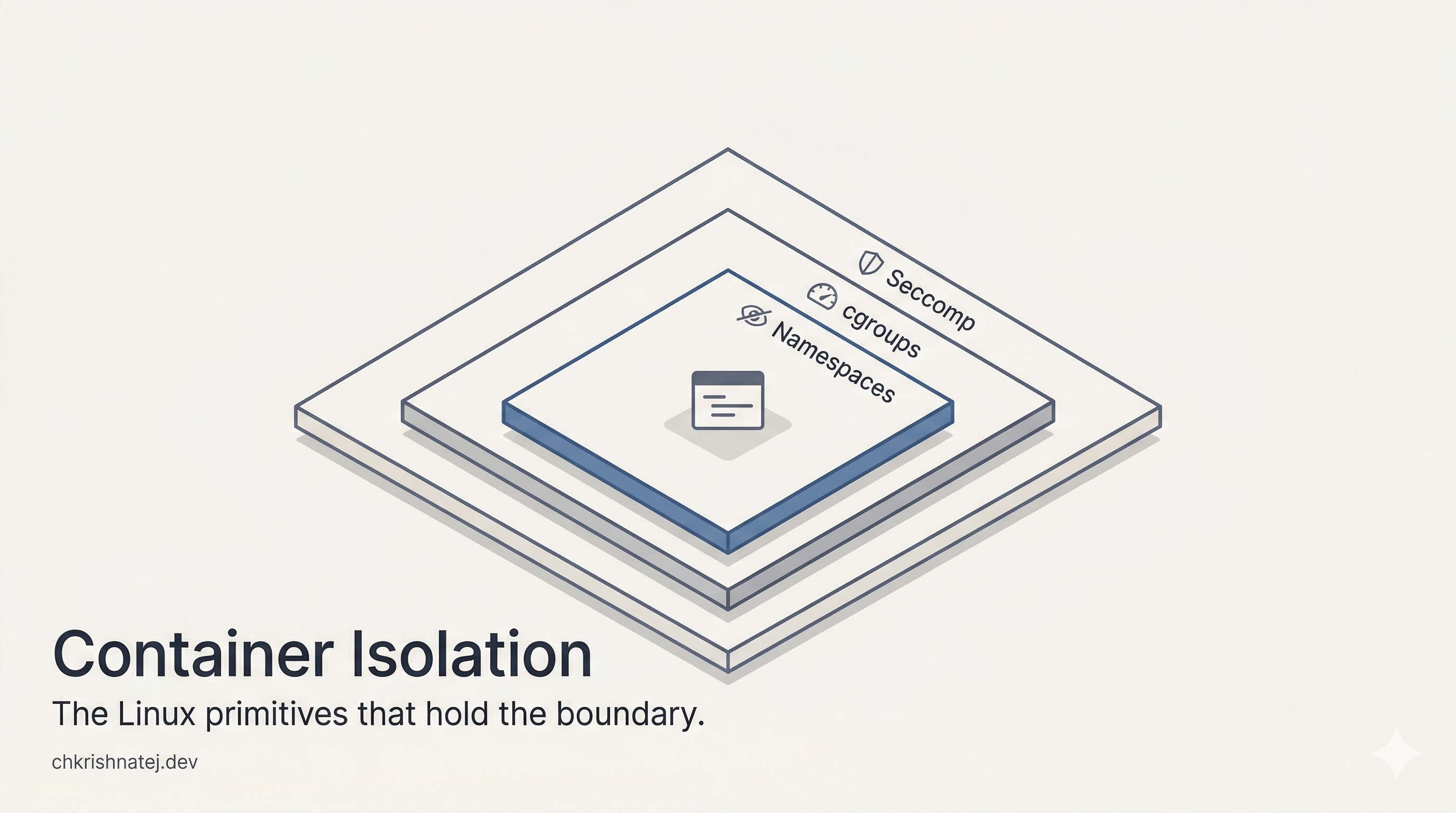
⚙️ The Kernel Did It First
Docker didn’t invent isolation. Linux did. Years earlier.
You trust your container runtime to isolate your workloads. But Docker and Podman don’t enforce anything at runtime. The Linux kernel does. This article is about the kernel primitives those runtimes configure and what happens when they are misconfigured.
Lets take example of the container we created previously
my-limited-httpd. Its pid is136841podman run -d \ 2 --name my-limited-httpd \ 3 --replace \ 4 --memory=512m \ # hard memory ceiling 5 --memory-swap=512m \ # swap ceiling equal to memory = no swap allowed 6 --cpus=1.5 \ # CPU quota: 1.5 cores worth of CPU time 7 --cpu-shares=512 \ # relative CPU weight during contention 8 --pids-limit=100 \ # max 100 processes/threads in this container 9 --blkio-weight=500 \ # relative block I/O weight 10 -p 8081:80 \ 11 registry.access.redhat.com/ubi8/httpd-24
Linux Namespaces - the eight curtains that hide the world from a process
How Linux Gives Every Process Its Own View of the World
We heard that containers provide isolation and security. Have you ever thought about what that actually means at the kernel level?
When a bad actor tries to run malicious code inside a container, a reverse shell, a privilege escalation attempt, they cannot creep into other parts of your system. That boundary is not enforced by Docker, Podman, or any container runtime. It is enforced by a Linux kernel feature called namespaces.
What Is a Namespace?
The man page puts it well:
A namespace wraps a global system resource in an abstraction that makes it appear to the processes within the namespace that they have their own isolated instance of the global resource.
My shorter version:
A namespace gives a process a filtered, isolated view of a specific system resource and localises control over it.
Without namespaces, all system resources are global. If any process changes the IP address of a network interface or unmounts a filesystem, every other process on the machine sees that change immediately. Namespaces scope that control so changes made inside one namespace stay there.
A Quick Proof with Hostnames
I ran uname -n on the host and inside two separate containers to see this in action.
 1# Host hostname
 2krish-local:~ # uname -n
 3krish-local
 4
 5# Container 1
 6krish-local:~ # podman exec my-httpd uname -n
 7614c1e03ee0b
 8
 9# Container 2
10krish-local:~ # podman exec my-limited-httpd uname -n
11a67892f30832
Each container sees a completely different hostname and the host is unaffected. Without Unix Time Sharing (UTS) namespace isolation, starting any container would overwrite krish-local with whatever hostname the container sets, and every process on the machine would see that change.
How to Find Namespaces on a Running System
Namespaces are not config files you can browse. They are kernel objects, and there are two practical ways to inspect them.
Via /proc/<pid>/ns/
Every process has a directory under /proc listing the namespaces it belongs to as symlinks. Each link points to the kernel namespace object via an inode number. I compared PID 1 on the host against the container process at PID 13684.
 1# Namespaces for host init process (PID 1)
 2krish-local:~ # ls -la /proc/1/ns/
 3total 0
 4lrwxrwxrwx 1 root root 0 Mar 31 01:47 cgroup -> 'cgroup:[4026531835]'
 5lrwxrwxrwx 1 root root 0 Mar 31 01:47 ipc    -> 'ipc:[4026531839]'
 6lrwxrwxrwx 1 root root 0 Mar 31 01:47 mnt    -> 'mnt:[4026531841]'
 7lrwxrwxrwx 1 root root 0 Mar 31 01:47 net    -> 'net:[4026531840]'
 8lrwxrwxrwx 1 root root 0 Mar 31 01:47 pid    -> 'pid:[4026531836]'
 9lrwxrwxrwx 1 root root 0 Mar 31 01:47 time   -> 'time:[4026531834]'
10lrwxrwxrwx 1 root root 0 Mar 31 01:47 user   -> 'user:[4026531837]'
11lrwxrwxrwx 1 root root 0 Mar 31 01:47 uts    -> 'uts:[4026531838]'
12
13# Namespaces for the container process (host PID 13684)
14krish-local:~ # ls -la /proc/13684/ns/
15total 0
16lrwxrwxrwx 1 default root 0 Mar 31 01:47 cgroup -> 'cgroup:[4026531835]'
17lrwxrwxrwx 1 default root 0 Mar 31 01:47 ipc    -> 'ipc:[4026532278]'
18lrwxrwxrwx 1 default root 0 Mar 31 01:47 mnt    -> 'mnt:[4026532276]'
19lrwxrwxrwx 1 default root 0 Mar 31 01:47 net    -> 'net:[4026532280]'
20lrwxrwxrwx 1 default root 0 Mar 31 01:47 pid    -> 'pid:[4026532277]'
21lrwxrwxrwx 1 default root 0 Mar 31 01:47 user   -> 'user:[4026531837]'
22lrwxrwxrwx 1 default root 0 Mar 31 01:47 uts    -> 'uts:[4026532279]'
Most inode numbers differ between the two processes, meaning they live in separate namespace instances. But cgroup and user share the same inode on both. That is expected for a rootless Podman setup on SLES 16 - those two namespaces are shared with the host by default.
These files are not readable and contain no data. They are handles the kernel uses for setns() (join an existing namespace) and unshare() (create a new one).
Via lsns
lsns gives a system-wide view of all active namespaces, which process owns each one, and how many processes share it.
 1krish-local:~ # lsns
 2        NS TYPE   NPROCS   PID USER    COMMAND
 34026531835 cgroup    142     1 root    /usr/lib/systemd/systemd
 44026531836 pid       138     1 root    /usr/lib/systemd/systemd
 54026531837 user      142     1 root    /usr/lib/systemd/systemd
 64026531838 uts       138     1 root    /usr/lib/systemd/systemd
 74026531839 ipc       138     1 root    /usr/lib/systemd/systemd
 84026531840 net       138     1 root    /usr/lib/systemd/systemd
 94026531841 mnt         1     1 root    /usr/lib/systemd/systemd
104026532276 mnt         8 13684 default httpd -D FOREGROUND
114026532277 pid         8 13684 default httpd -D FOREGROUND
124026532278 ipc         8 13684 default httpd -D FOREGROUND
134026532279 uts         8 13684 default httpd -D FOREGROUND
144026532280 net         8 13684 default httpd -D FOREGROUND
The container’s mnt, pid, ipc, uts, and net namespaces show up as separate entries with their own inodes. The NPROCS column shows 8 processes sharing each one, the httpd worker pool all living inside the same namespace instances.
Do Namespaces Exist Per Process, or Only When Explicitly Created?
Every process on Linux is always inside a namespace. There is no such thing as a process with no namespace membership. When the kernel boots, it creates the initial default namespaces and every subsequent process inherits its parent’s namespaces unless it explicitly asks for new ones via unshare() or clone().
I verified this by comparing two unrelated host processes:
1# PID 1 (systemd) and PID 2 (kthreadd) — do they share the PID namespace?
2krish-local:~ # readlink /proc/1/ns/pid
3pid:[4026531836]
4
5krish-local:~ # readlink /proc/2/ns/pid
6pid:[4026531836]
Same inode. Both processes are in the initial PID namespace, inherited at boot. Now compare against the container:
1krish-local:~ # readlink /proc/13684/ns/pid
2pid:[4026532277]
Different inode. When Podman started the container, it called `clone()` with `CLONE_NEWPID`, which created a fresh PID namespace. The container process lives in that new namespace. Everything else on the host does not.
Before Namespaces - Why chroot Was Not Enough
Before namespaces, chroot was the closest Linux had to process isolation. It changes the apparent root directory of a process so it cannot walk up the filesystem tree and access files outside its jail. Filesystem isolation only, and even that was leaky.
A process inside a chroot jail could still see every running process on the host, bind to any network port, and read /proc for sensitive information. Worse, a root process could escape the jail entirely using a two-step chdir and second chroot call. It was a convenience tool that got misused as a security boundary. Namespaces were built precisely because chroot was not enough.
The 8 Namespace Types
There are 8 namespace types in the Linux kernel, each isolating a specific category of system resource.
| Namespace | Kernel Flag | What It Isolates |
|---|---|---|
| pid | CLONE_NEWPID |
Process ID space. Processes start from PID 1 inside the namespace and cannot see PIDs outside it. |
| net | CLONE_NEWNET |
Network stack - interfaces, routing tables, iptables rules, sockets. Each namespace gets its own lo. |
| mnt | CLONE_NEWNS |
Filesystem mount points. Mount and unmount operations stay local to the namespace. |
| uts | CLONE_NEWUTS |
Hostname and NIS domain name. UTS stands for UNIX Time-sharing System, a historical name. |
| ipc | CLONE_NEWIPC |
System V IPC objects and POSIX message queues. Shared memory segments and semaphores are invisible across IPC namespaces. |
| user | CLONE_NEWUSER |
UID and GID mappings. A process can be UID 0 inside a user namespace while remaining unprivileged on the host. This is the foundation of rootless containers. |
| cgroup | CLONE_NEWCGROUP |
The visible root of the cgroup hierarchy. A process sees its own cgroup as / rather than its full path on the host. |
| time | CLONE_NEWTIME |
Clock offsets for CLOCK_MONOTONIC and CLOCK_BOOTTIME. Added in kernel 5.6. |
The failure modes map directly to the namespace that is missing or misconfigured.
- Network traffic bleeding between containers? Check the
netnamespace flags. - A container that can see host processes? Missing
CLONE_NEWPID. - A rootless container that cannot bind port 80? That is the user namespace UID mapping, not a firewall rule.
Why Every Container Gets Its Own Namespaces
A container without its own namespaces is just a process running under a different user. Nothing stops it from seeing every other process on the host, connecting to any network interface, reading any mounted filesystem, or changing the hostname.
The isolation contract containers offer, the reason you trust them to run third-party code or multi-tenant workloads, is entirely backed by namespace separation. I wrote a small loop to verify exactly which namespaces Podman isolates versus shares for this container:
 1krish-local:~ # for ns in cgroup ipc mnt net pid user uts; do \
 2>     host=$(readlink /proc/1/ns/$ns); \
 3>     container=$(readlink /proc/13684/ns/$ns); \
 4>     if [ "$host" = "$container" ]; then \
 5>         echo "$ns: SHARED      ($host)"; \
 6>     else \
 7>         echo "$ns: ISOLATED    host=$host  container=$container"; \
 8>     fi; \
 9> done
10cgroup: ISOLATED    host=cgroup:[4026531835]  container=cgroup:[4026532514]
11ipc: ISOLATED    host=ipc:[4026531839]  container=ipc:[4026532512]
12mnt: ISOLATED    host=mnt:[4026531841]  container=mnt:[4026532510]
13net: ISOLATED    host=net:[4026531840]  container=net:[4026532438]
14pid: ISOLATED    host=pid:[4026531836]  container=pid:[4026532513]
15user: SHARED      (user:[4026531837])
16uts: ISOLATED    host=uts:[4026531838]  container=uts:[4026532511]
cgroup and user are shared because this is a rootless Podman setup. In a rootful setup or inside a Kubernetes pod the picture changes. But each isolated entry is a hard boundary enforced by the kernel, not by Podman.
Namespaces are not a container feature. They are a Linux kernel feature that container runtimes use. At its core, podman run is a sequence of clone() syscalls with the right namespace flags, followed by execve() to start your workload.
Once you see it that way, debugging changes. When a container leaks network traffic, you look at the net namespace configuration. When PID visibility bleeds across containers, you check pid namespace flags. When a rootless container cannot bind to a privileged port, you trace it back to user namespace UID mapping.
The runtime configures. The kernel enforces. Namespaces are the mechanism sitting between them.
cgroups - resource accounting, limiting, and the hierarchy model
What is cgroup
cgroup provide a mechanism to allocate and control the amount of resources provided to a process. They are a core part of kernel and is found in all latest major linux distributions.
cgroup are managed via a virtual filesystem called cgroupfs which is mounted on /sys/fs/cgroup
cgroup majorly composed of 2 parts - core and controller
- core is responsible for hierarchically organising the processes in tree structure
- controller is responsible for distributing the resources
How is cgroup represented
Capturing the CGROUP_PATH using PID:
1krish-local:~ # PID=13684
2krish-local:~ # CGROUP_PATH=$(cat /proc/$PID/cgroup | cut -d: -f3)
3krish-local:~ # echo $CGROUP_PATH
4/machine.slice/libpod-a67892f3083285e34c738fd1e75cccd7eaadbda71f5a8c60a522e73546c0d5a2.scope
The string /machine.slice/libpod-a67892f3083285e34c738fd1e75cccd7eaadbda71f5a8c60a522e73546c0d5a2.scope is a hierarchical identifier used by systemd and the kernel to organize and track resource allocation.
Component Breakdown
| Component | Meaning |
|---|---|
| /machine.slice | The Systemd Slice. Slices are units that manage resources for a group of processes. machine.slice is the default container for virtual machines and containers. |
| libpod- | The Prefix. This indicates that the process is managed by Podman (Libpod). |
| a67892f3…d5a2 | The Container ID. This is the full 64-character SHA-256 hash of the Podman container. |
| .scope | The Systemd Unit Type. Unlike a .service, a .scope manages externally started processes. It ensures that if the container exits, all child processes are cleaned up. |
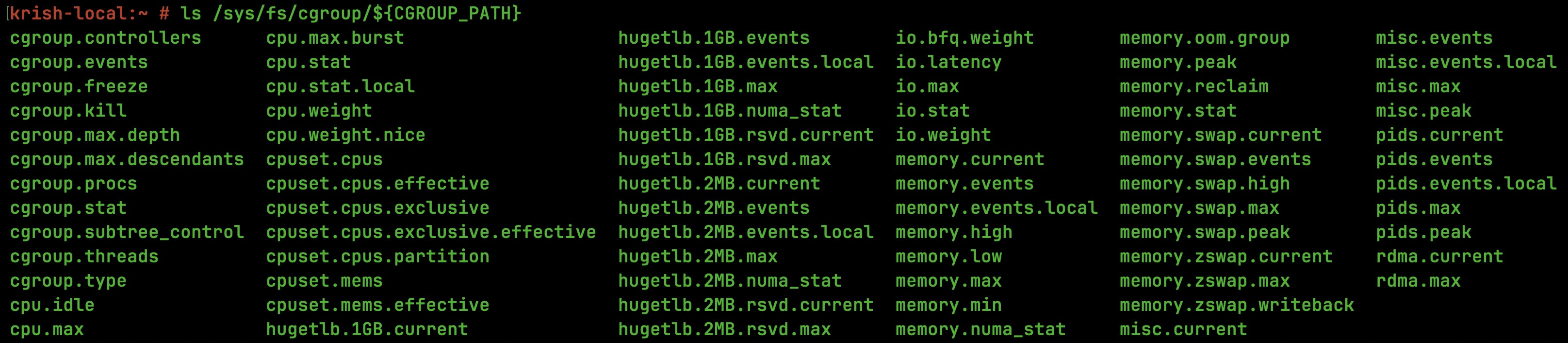
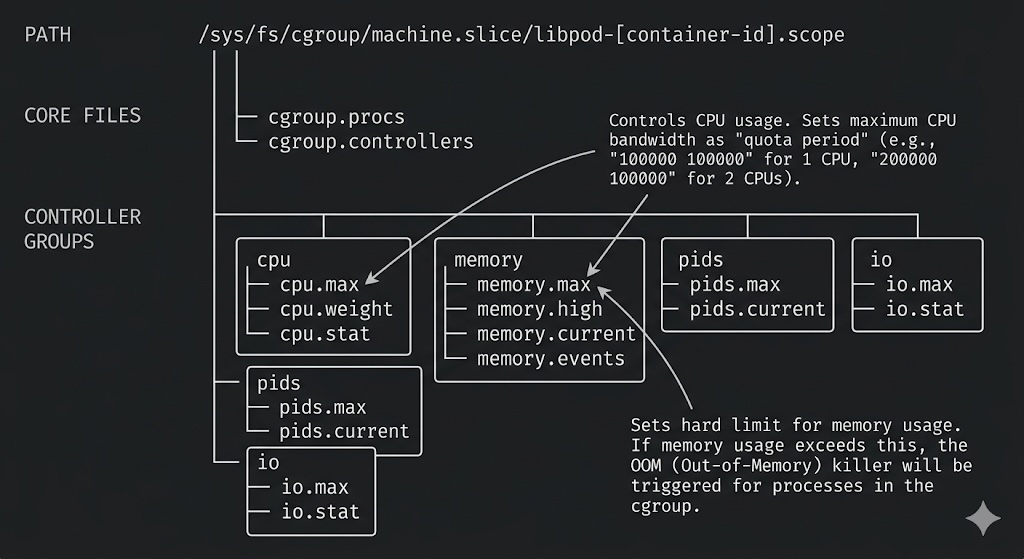
There are a dozen files in that directory. I will walk through three that directly map to the limits we set, because they show how the kernel translates a podman run flag into an enforced constraint.
memory.max — the hard memory ceiling
1krish-local:/sys/fs/cgroup/...scope # cat memory.max | numfmt --to=iec
2512M
This is the number the kernel checks on every memory allocation inside this cgroup. We passed --memory=512m to Podman. Podman wrote 536870912 (512 in bytes) to this file, and the kernel picked it up immediately.
The container does not know this limit exists — its allocator just starts getting OOM-killed if it crosses the line.
The numfmt --to=iec is just for readability. The raw value is bytes. The kernel does not deal in mebibytes.
cpu.max — the CPU bandwidth contract
1krish-local:/sys/fs/cgroup/...scope # cat cpu.max
2150000 100000
This one takes a moment to read. The format is [quota] [period], both in microseconds. What it says is:within every 100ms window, this cgroup is allowed to consume at most 150ms of CPU time across all cores.
On a multi-core machine, that is not a contradiction. If two cores are both running threads from thiscontainer simultaneously, they each consume from the same quota bucket. The math is 150000 / 100000 = 1.5,which is exactly the --cpus=1.5 we passed. The container is logically entitled to 1.5 vCPUs.
When the quota runs out mid-period, the CFS scheduler parks every thread in this cgroup until the next periodstarts. From inside the container, this looks like the CPU went silent. From outside, cpu.stat will show itas throttled time. That distinction matters when you are debugging latency spikes that do not correlate withload.
memory.events — your first stop for unexplained restarts
1krish-local:/sys/fs/cgroup/...scope # cat memory.events
2low 0
3high 0
4max 0
5oom 0
6oom_kill 0
7oom_group_kill 0
All zeros here means the container has not been under memory pressure. But this file is the reason I check cgroup state before reading application logs when a container restarts unexpectedly.
Each counter maps to a specific kernel event. low and high are early-warning thresholds, the kernel tries to reclaim memory before things get critical. max counts how many times an allocation was about to breach memory.max. oom_kill is the one that matters: it increments every time the kernel selected and killed a process inside this cgroup to recover memory.
If oom_kill is non-zero and your container keeps restarting, you have your answer. It was not a crash, not a bug in your application, not a transient deployment issue. The kernel ran out of room and killed something. The memory limit is too tight. No amount of reading application logs will tell you this as the kill happens at the kernel level, below your process, before it gets a chance to write anything. This is the first file to check.
How does cgroups enforce limits
The linux kernel enforces the cgroups limits. It is specifically done via Completely Fair Scheduler (CFS) for CPU and the Memory Controller (memcg) for RAM.
It is helpful to think of the files in /sys/fs/cgroup as Shared Memory between you and the Kernel. When you write to a file, you are updating a variable in the Kernel’s internal data structures.
The kernel does not snapshot these values at container start. The CFS scheduler reads cpu.max on every scheduling period. The memory controller checks memory.maxon every page fault. Writing a new value to memory.max takes effect immediately on the running container, no restart required. That is what makes live resource adjustment in Kubernetes possible.
How containers leverage cgroups
The container runtime serves as a configuration interface that translates human-readable resource requests into kernel-enforced constraints.
While the runtime performs the initial validation and writes the limits to the cgroup filesystem, it remains passive during execution. Real-time enforcement is handled exclusively by the Linux kernel via subsystems like the Completely Fair Scheduler (CFS) and the memory controller.
 1Process allocates memory
 2        │
 3        ▼
 4  mem_cgroup_charge()  ◄─── called on every page fault / alloc
 5        │
 6        ├── usage < memory.max?  ──► allow, increment counter
 7        │
 8        └── usage >= memory.max?
 9                │
10                ├── memory.swap.max available? ──► swap out pages
11                │
12                └── no swap headroom?  ──► trigger OOM killer
13                                             inside the cgroup
In this architecture, the runtime functions as a policy-maker that establishes boundaries, while the kernel operates as the persistent enforcer that monitors and restricts resource consumption at the hardware level.
The cgroup filesystem acts as the shared ledger of these restrictions, ensuring process isolation without requiring the runtime to remain active.
Failure mode: a container runtime crash like Docker daemon dying or Podman exiting does not release or relax the cgroup limits already written. The kernel continues enforcing them against every process in that cgroup until the cgroup itself is deleted. This is why a container can keep running and stay resource-limited even if the runtime that started it is no longer present.
Are cgroups and namespaces vital part of serverless computing?
cgroups and namespaces are foundational pillars of serverless computing.
Serverless platforms must run thousands of tenant workloads on shared physical hosts, with strict guarantees around:
- Resource isolation (CPU, memory, I/O per function invocation)
- Resource limits (prevent one noisy tenant from starving others)
- Fast spin-up / teardown (cold start latency matters enormously)
cgroups are what enforce the resource side of this contract. And namespaces provide isolation of system resources for the process
 1┌──────────────────────────────────────┐
 2│         Serverless Function          │
 3├──────────────────────────────────────┤
 4│    Linux Namespaces (pid, net, mnt)  │  ← What it can *see*
 5│    cgroups v2                        │  ← What it can *consume*
 6│    seccomp / AppArmor / SELinux      │  ← What syscalls it can *make*
 7├──────────────────────────────────────┤
 8│    Container Runtime / MicroVM       │
 9│    (runc, gVisor, Firecracker)       │
10├──────────────────────────────────────┤
11│         Host Kernel                  │
12└──────────────────────────────────────┘
| Serverless Requirement | cgroup Subsystem | What It Does |
|---|---|---|
| Memory limit per function | memory | Enforces max RSS, triggers OOM kill if breached |
| CPU throttling | cpu / cpuquota | Limits how many CPU cycles a function can consume per period |
| CPU fairness across tenants | cpu.shares / cpu.weight | Weighted scheduling between competing cgroups |
| I/O bandwidth control | blkio / io (v2) | Limits disk reads/writes per function sandbox |
| Process count limits | pids | Prevents fork bombs inside a container |
| Network accounting | net_cls, net_prio | Tags traffic for per-tenant accounting |
cgroups also play a subtle role in cold start performance. When a new sandbox is created:
- A new cgroup hierarchy is created (
mkdir /sys/fs/cgroup/...) - The process is forked and its PID is written to
cgroup.procs - Resource limits are written to the subsystem files
Steps 1–3 are microsecond-range operations in the kernel that are intentionally designed to be lightweight so platforms can spin up sandboxes at high frequency.
This is why AWS Lambda chose Firecracker over full VMs Firecracker boots a microVM in ~125ms partly because creating the cgroup hierarchy for the new sandbox is a microsecond-range kernel operation.
Google’s gVisor takes a different path: it usesSECCOMP_RET_TRAP to redirect syscalls to a user-space kernel called Sentry, but the Sentry process itself is still bound by a cgroup on the host. The abstraction layer changes; the cgroup dependency does not.
Seccomp and Linux Capabilities — the syscall filter layer that completes the isolation picture
Namespaces and cgroups leave one attack surface open. A process inside a fully isolated namespace with strict memory and CPU limits can still make arbitrary syscalls to the kernel - ptrace(), mount(), kexec_load(). None of that is restricted by what a process can see or how much it can consume. Seccomp closes that gap.
Seccomp (Secure Computing Mode) installs a BPF program into the kernel that intercepts every syscall before it executes. The filter has access to the syscall number and its register arguments. It returns a verdict - allow, block with errno, or kill the process immediately. There is no userspace involved. The interception happens at the kernel syscall entry point, before any kernel subsystem processes the request.
For a deeper reference on Linux Capabilities and the full privilege model, see the capabilities(7) man page.
How containers use seccomp
Container runtimes ship a default seccomp profile, a JSON allowlist of syscalls the container is permitted to make. When runc starts a container, it installs this profile via prctl(PR_SET_SECCOMP) before handing control to the container process. You can verify it is active on any running container:
1krish-local:~ # cat /proc/13684/status | grep Seccomp
2Seccomp:         2
3Seccomp_filters: 1
Seccomp: 2is filter mode.Seccomp_filters: 1confirms one BPF profile is loaded.
The default profile blocks syscalls like kexec_load, mount, ptrace, and perf_event_open , things a legitimate application container has no business calling but which are useful primitives for host escape or side-channel attacks.
Failure mode
The exposure is silent. A container running with seccomp disabled starts and behaves identically to one with a profile loaded until something exploits the open syscall surface. There is nothing in container logs or runtime output that indicates the filter is missing.
1krish-local:~ # cat /proc/<pid>/status | grep Seccomp
2Seccomp:         0
Seccomp: 0 means disabled. The most common cause is --security-opt seccomp=unconfined set for debugging and never removed, or a custom base image that explicitly disables it. Either way it is a finding, not a configuration preference.
How isolation is actually achieved
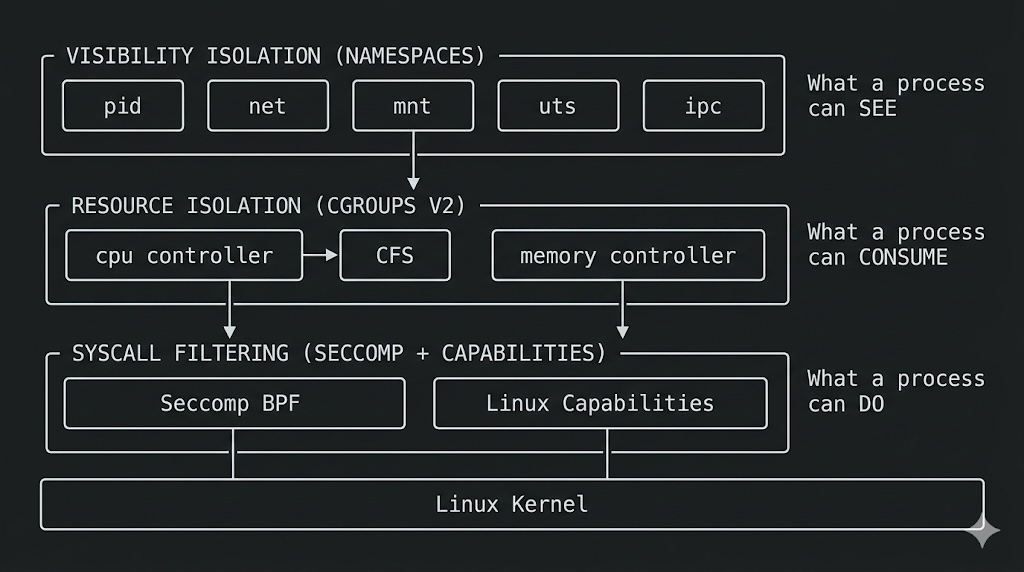
Docker or Podman didn’t build the cage. Linux did.
The runtime is a thin configuration layer. It translates --memory=512m and --cpus=1.5 into writes on a virtual filesystem, sets up namespace boundaries via clone(), installs a seccomp BPF filter, and steps aside. From that point, the kernel owns enforcement permanently, without the runtime present, without the container knowing.
Namespaces control what a process sees. cgroups control what it consumes. Seccomp controls what it can ask the kernel to do. Three orthogonal subsystems, each independently enforceable, none sufficient alone.
When isolation breaks in production, the failure is almost never in the runtime. It is in one of these three layers - a missing namespace flag, a memory limit that was never set, a seccomp profile replaced with unconfined for a debug session that never got reverted. The kernel enforces exactly what you configure. Not more.
That is the contract. It is precise, unambiguous, and entirely your responsibility to get right.